

[Jan-2022] Microsoft PL-100 DUMPS WITH REAL EXAM QUESTIONS
2022 New PassTestking PL-100 PDF Recently Updated Questions
Highlights of the Microsoft PL-100 exam
The Microsoft PL-100 exam is delivered in the English language only. The test measures the competence of the candidates in designing solutions, creating solutions, implementing & managing solutions, and analyzing data. It is the only qualifying exam that the applicants must pass to earn the Microsoft Certified: Power Platform App Maker Associate certification. The individuals for the test must schedule it with Pearson VUE and pay the fee of $165. The number of questions that the students may expect is around 40-60. Their types that may be administered during the delivery of the exam include active screen, build list, short answer, best answer, case studies, drag and drop, and multiple choice.
NEW QUESTION 63
You need to roll back the mobile app to an earlier version.
What should you do? To answer, select the appropriate options in the answer area.
NOTE: Each correct selection is worth one point.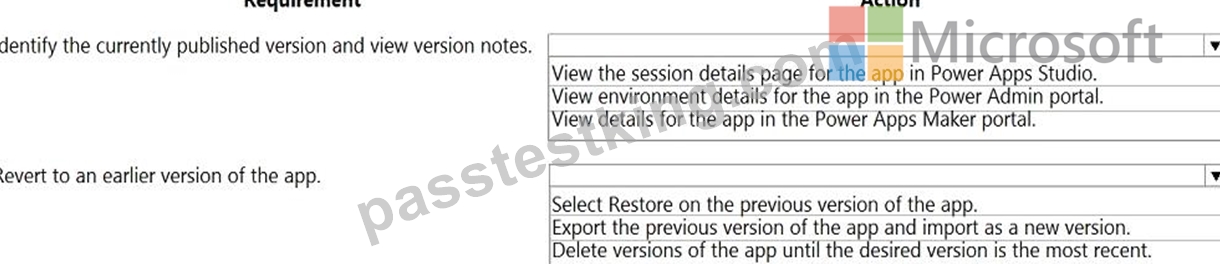
Answer:
Explanation: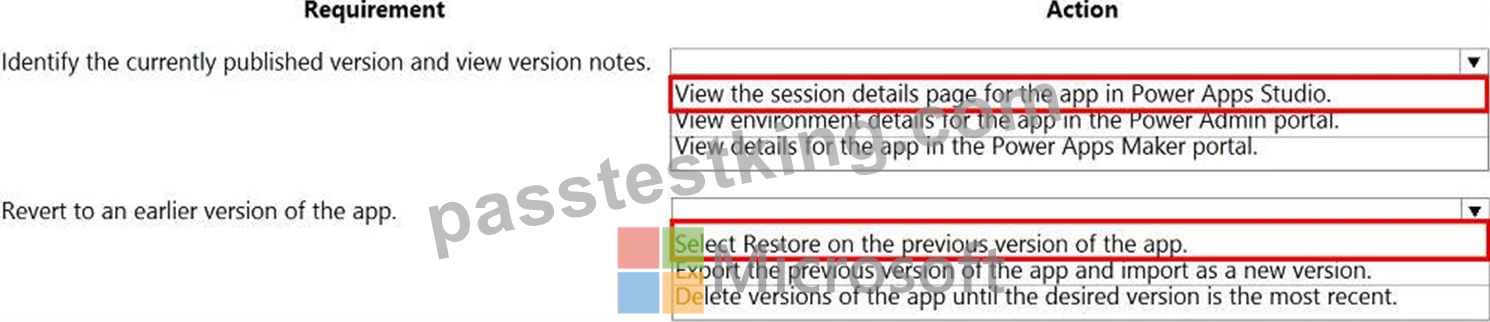
Reference:
https://powerapps.microsoft.com/sk-sk/blog/saveandpublish/
https://docs.microsoft.com/en-us/powerapps/maker/canvas-apps/restore-an-app
NEW QUESTION 64
You are an app builder for a medical office. The medical office uses activities to book appointments and business process flows to track patient status. The cleaning staff wants the app to connect directly to a Microsoft Excel workbook to track cleaning tasks. The office does not have access to reporting tools including Power BI.
You need to create apps for the following groups of users. Apps must not require customizations or the use of additional products.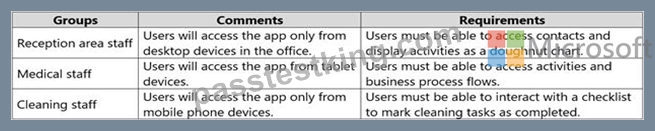
Which type of app should you build for each group? To answer, drag the appropriate app types to the correct groups. Each app type may be used once, more than once, or not at all. You may need to drag the split bar between panes or scroll to view content.
NOTE: Each correct selection is worth one point.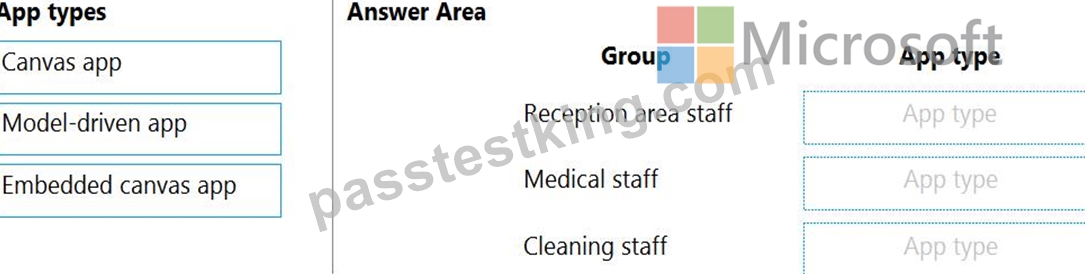
Answer:
Explanation: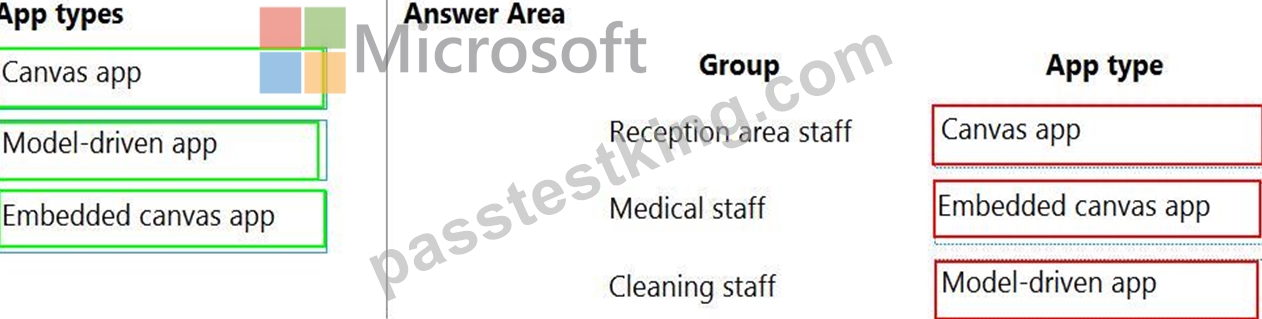
Reference:
https://docs.microsoft.com/en-us/powerapps/maker/model-driven-apps/embedded-canvas-app-guidelines
https://global.hitachi-solutions.com/blog/canvas-vs-model-driven-apps
NEW QUESTION 65
You complete work on a new canvas app in a development environment and add the app to a solution. You export the solution from the development environment and import the solution into a production environment.
After several days you notice that the background color for the canvas app in the production environment has changed from white to grey.
You need to determine why the background color changed.
What are two possible causes for the background color change? Each correct answer presents a complete solution.
NOTE: Each correct selection is worth one point.
- A. You chose a different theme from the Theme menu inside the canvas app.
- B. You exported and imported an unmanaged copy of the solution and a co-worker modified the canvas app.
- C. You recently changed the Office 365 theme.
- D. You exported a managed copy of the solution and imported the solution as an unmanaged solution. You modified the canvas app in the unmanaged solution.
Answer: B,C
Explanation:
A: You can create a custom look and feel (a theme), for your app by making changes to the default colors and visual elements provided in the uncustomized system.
C: Unmanaged Solution: The beginning state of solution is the unmanaged solution state. During this phase, you can add, edit, update, remove, delete, and test any of the components of the solution. You also have the ability to create restrictions on the components within the solution.
Note: Managed Solution: A managed solution is a finalized solution that can be distributed and installed. They are created by exporting an unmanaged solution by setting restrictions to prevent any further customizations. The whole point of Managed is locking down the Component states so they cannot be edited.
Reference:
https://powerusers.microsoft.com/t5/Power-Apps-Pro-Dev-ISV/Managed-vs-Unmanaged/td-p/495685
https://docs.microsoft.com/en-us/powerapps/maker/model-driven-apps/create-themes-organization-branding
NEW QUESTION 66
You need to implement features for the solution.
Which Power Platform component should you use for each feature? To answer, select the appropriate options in the answer area.
NOTE: Each correct selection is worth one point.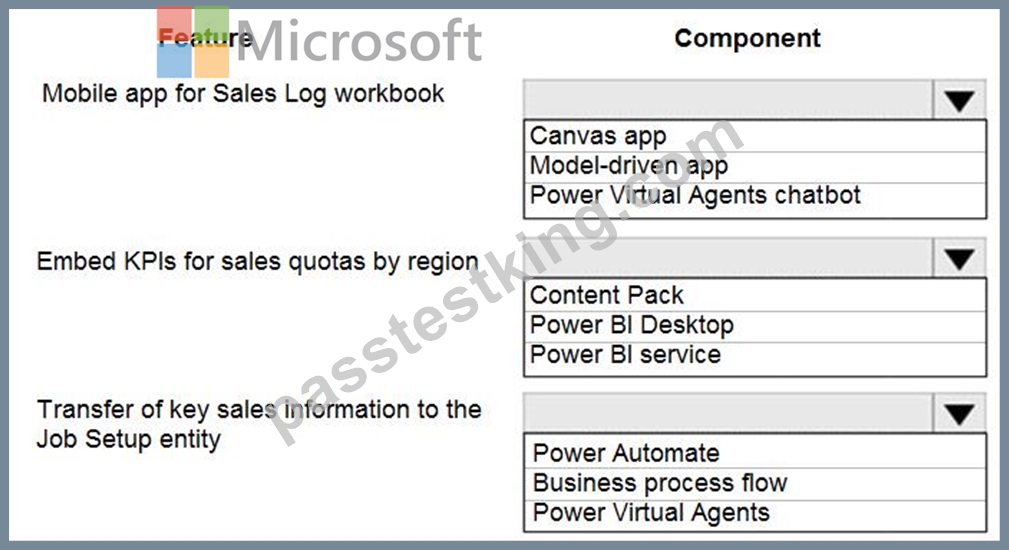
Answer:
Explanation: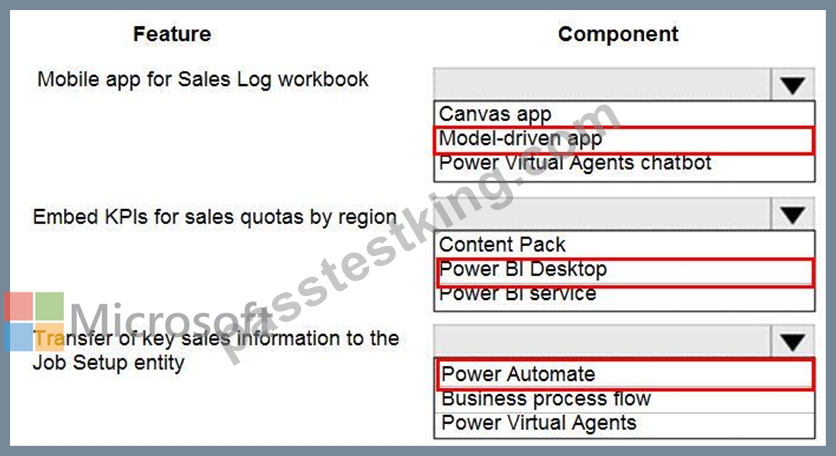
NEW QUESTION 67
You create a canvas app.
A user is not able to determine which field currently has focus. You run App checker to identify errors.
You need to verify that the focused border thickness is set to a value greater than zero.
Which section of the App checker results should you check?
- A. Rules
- B. Performance
- C. Accessibility
- D. Runtime
Answer: C
Explanation:
The Accessibility checker classifies each issue as an error, a warning, or a tip based the issue's severity.
Issues include:
* Focus isn't showing
When the FocusBorderThickness of a control is set to 0. It is good practice to ensure a proper color-contrast ratio between the focus border and the control itself so it's clearly visible.
Reference:
https://docs.microsoft.com/en-us/powerapps/maker/canvas-apps/accessibility-checker
NEW QUESTION 68
You need to set the value for a global variable named RunningTotal to 5 and navigate to the previous screen named MainScreen.
Which formula should you use?
- A. If( Value(TextBox1.Text) >= 0, (Set( RunningTotal, 5);
Back();), Color.Green ) - B. UpdateContext( { RunningTotal: 5 } ); Navigate( MainScreen,
ScreenTransition.Cover, RunningTotal ); - C. Set( RunningTotal, 5 ); Back();
- D. UpdateContext( { RunningTotal:5 } ); Back()
Answer: C
Explanation:
You set the value of the global variable with the Set function. Set( MyVar, 1 ) sets the global variable MyVar to a value of 1.
Use the Back and Navigate function to change which screen is displayed.
Reference:
https://docs.microsoft.com/en-us/powerapps/maker/canvas-apps/working-with-variables
https://docs.microsoft.com/en-us/powerapps/maker/canvas-apps/functions/function-navigate
NEW QUESTION 69
HOTSPOT
You need to configure the system to meet the requirements.
What should you use? To answer, select the appropriate options in the answer area.
NOTE: Each correct selection is worth one point.
Hot Area: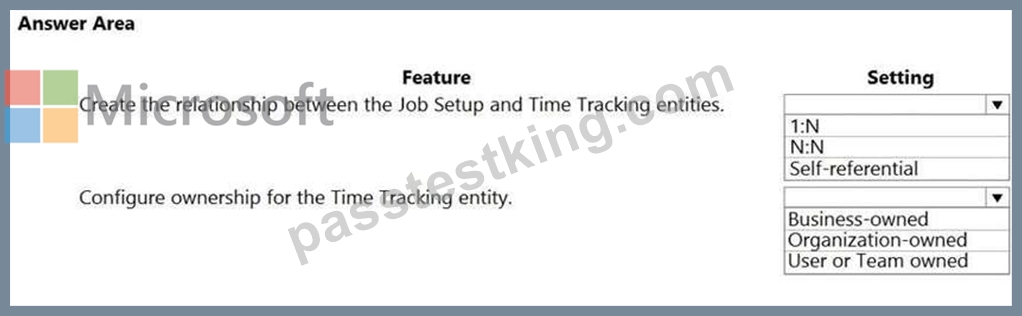
Answer:
Explanation: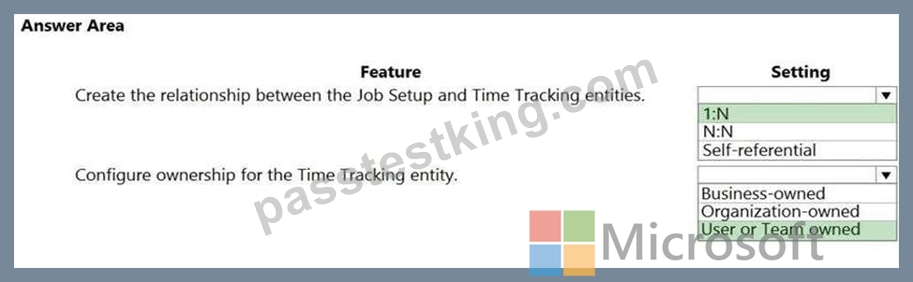
Explanation:
Box 1: 1:N
Scenario: A sortable listing of all in-process jobs from the Job Setup table, by customer, start date, and product.
Box 2: User or Team owned
Scenario: Employees must only be able to access their own time tracking records from the app.
User or team: Data belongs to a user or a team. Actions that can be performed on these records can be controlled on a user level.
Reference:
https://docs.microsoft.com/en-us/powerapps/maker/common-data-service/types-of-entities
NEW QUESTION 70
A production line app maker at a manufacturing company creates a canvas app that looks for available inventory in a SQL database. The production line workers use the inventory app across all work centers.
The production line workers report the following app issues from the shop floor:
The app reports a delegation warning.
Voice command functionality is unreliable.
You have minimal information about the issues. You are not allowed to enter the production facility.
You need to troubleshoot the issues.
How should you troubleshoot the issues? To answer, select the appropriate options in the answer area.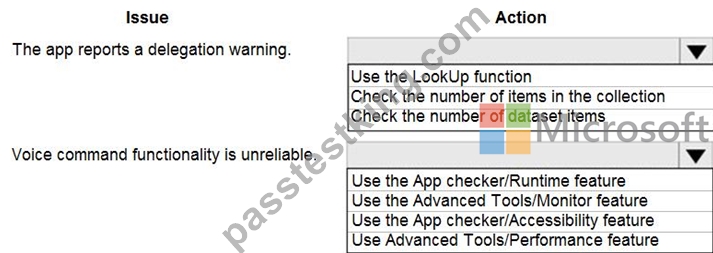
Answer:
Explanation: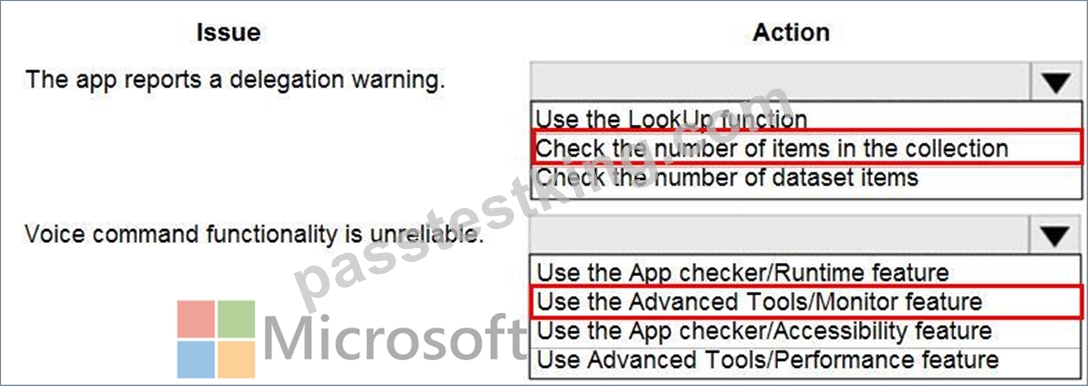
Reference:
https://docs.microsoft.com/en-us/powerapps/maker/canvas-apps/delegation-overview
https://docs.microsoft.com/en-us/powerapps/maker/monitor-canvasapps
NEW QUESTION 71
You are designing a canvas app.
You need to select user interface controls to include in the app.
Which control should you use? To answer, drag the appropriate controls to the correct requirements. Each control may be used once, more than once, or not at all. You may need to drag the split bar between panes or scroll to view content.
NOTE: Each correct selection is worth one point.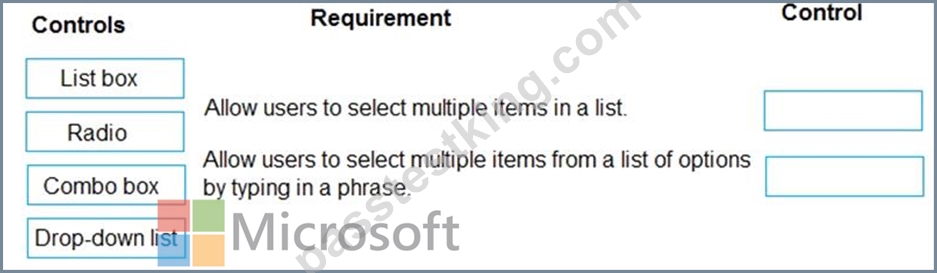
Answer:
Explanation: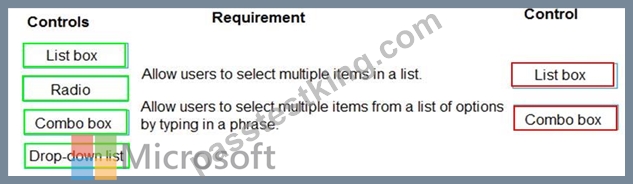
Reference:
https://docs.microsoft.com/en-us/powerapps/maker/canvas-apps/controls/control-list-box
https://docs.microsoft.com/en-us/powerapps/maker/canvas-apps/controls/control-combo-box
NEW QUESTION 72
You are an app builder for a medical office. The medical office uses activities to book appointments and business process flows to track patient status. The cleaning staff wants the app to connect directly to a Microsoft Excel workbook to track cleaning tasks. The office does not have access to reporting tools including Power BI.
You need to create apps for the following groups of users. Apps must not require customizations or the use of additional products.
Which type of app should you build for each group? To answer, drag the appropriate app types to the correct groups. Each app type may be used once, more than once, or not at all. You may need to drag the split bar between panes or scroll to view content.
NOTE: Each correct selection is worth one point.
Answer:
Explanation: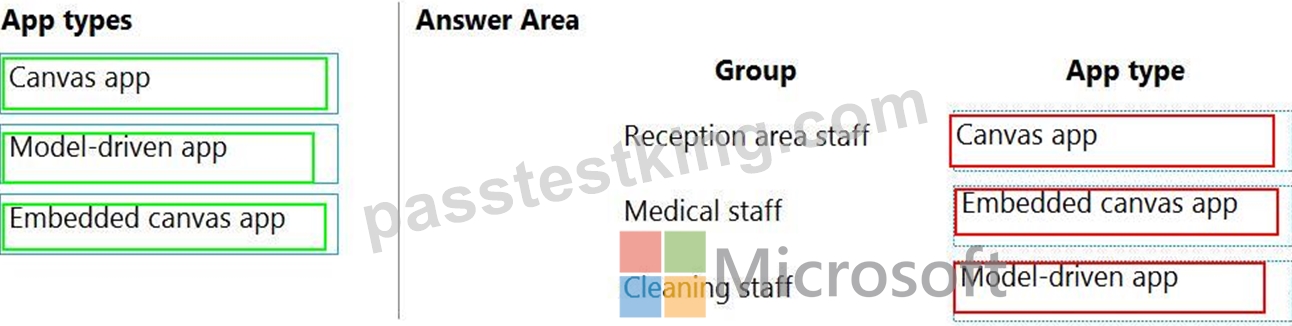
Reference:
https://docs.microsoft.com/en-us/powerapps/maker/model-driven-apps/embedded-canvas-app-guidelines
https://global.hitachi-solutions.com/blog/canvas-vs-model-driven-apps
NEW QUESTION 73
You need to configure the app to meet the requirements.
Which object properties should you configure? To answer, select the appropriate options in the answer area.
NOTE: Each correct selection is worth one point.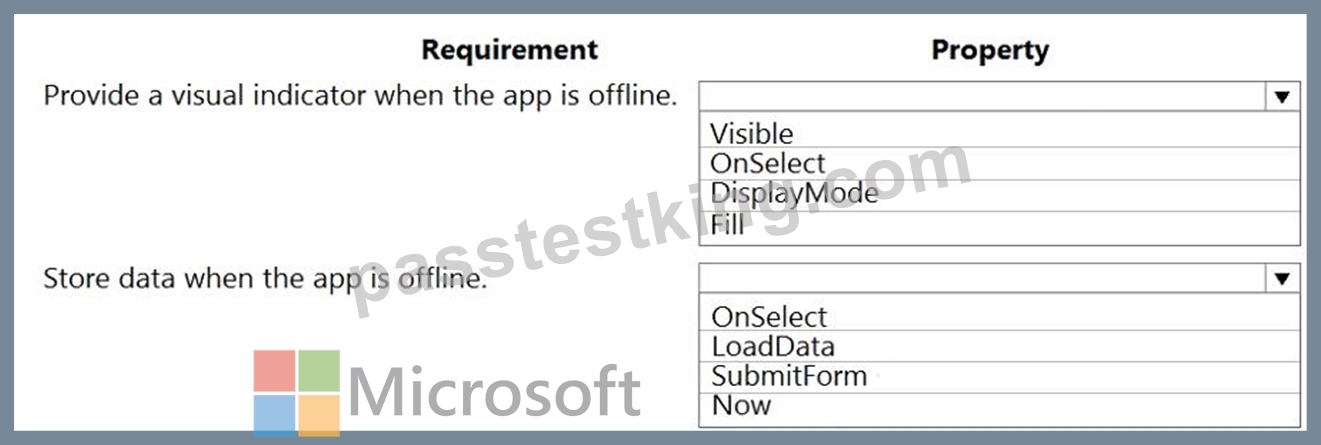
Answer:
Explanation: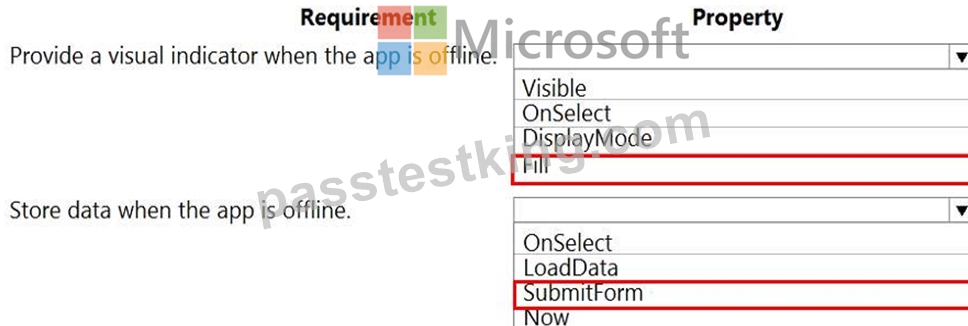
Reference:
https://docs.microsoft.com/en-us/powerapps/maker/canvas-apps/controls/control-screen
https://docs.microsoft.com/en-us/powerapps/maker/canvas-apps/functions/function-form
NEW QUESTION 74
You have a solution that contains a Power Automate flow, an environment variable, and a model-driven app.
Which three steps should you perform in sequence? To answer, move the appropriate actions from the list of actions to the answer area and arrange them in the correct order.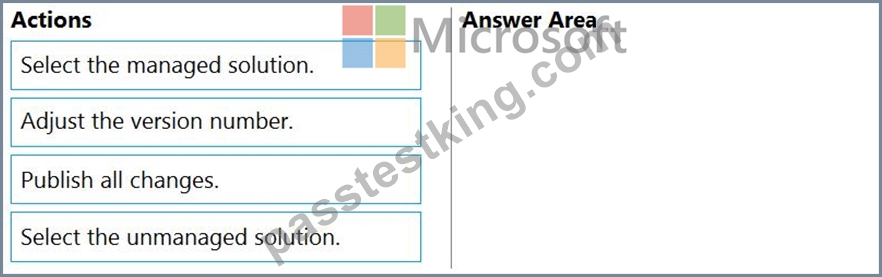
Answer:
Explanation: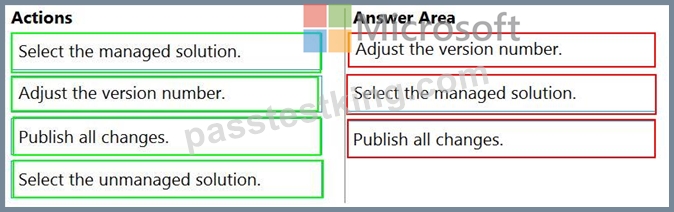
Reference:
https://powerusers.microsoft.com/t5/Power-Apps-Pro-Dev-ISV/Managed-vs-Unmanaged/td-p/495685
NEW QUESTION 75
Note: This question is part of a series of questions that present the same scenario. Each question in the series contains a unique solution that might meet the stated goals. Some question sets might have more than one correct solution, while others might not have a correct solution.
After you answer a question in this section, you will NOT be able to return to it. As a result, these questions will not appear in the review screen.
You build a canvas app for a manufacturing company. The company receives parts and materials from many vendors. You create a form to collect information from packing slips.
Receivers must be able to take a picture of packing slips to receive materials instead of manually entering data in the app.
You need to ensure that users can scan packing slip information into the form.
Proposed solution: Use a Key Phrase Extraction model.
Does the solution meet the goal?
- A. No
- B. Yes
Answer: A
Explanation:
The key phrase extraction prebuilt model identifies the main points in a text document.
Reference:
https://docs.microsoft.com/en-us/ai-builder/prebuilt-key-phrase
Topic 2, Wide World Importers
Background
Current environment
Sales representatives submit weekly status reports to regional managers. There is no standardized format for these status reports. The process for managing status reports is challenging.
Wide World Importers has decided to use Microsoft 365, Microsoft Azure, and Power Platform for future app development. Both Wide World Importers and Tailwind Traders have identical Microsoft SharePoint and Azure configurations. Both companies use separate tenants.
Requirements
Application
You must create a mobile app to streamline the creation of status reports by sales representatives. You must make the same app available to Tailwind Traders. The mobile app must meet the following requirements:
Minimize the use of code.
Use formulas and expressions when necessary.
Support a variety of visual layouts.
Use a SharePoint list to store information about regional managers and sales representatives.
Use Azure SQL Database to store other data.
Status reports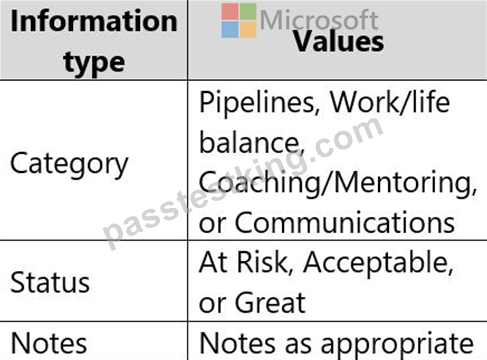
If a sales representative submits a status report and assigns the At Risk status to a process, the app must prompt the sales representative to enter a detailed description for the risk. This information must be emailed to the regional manager. If the category is Work/life balance, the information must be carbon copied to the human resources department.
If a sales representative does not submit a weekly status report by an agreed upon deadline, the system must send an email to remind the sales representative.
The app must be able to run both online and offline. If the mobile device on which the app runs is connected to the internet, the app must immediately submit the status report.
You must display a visual indicator in the app so that sales representatives know whether the app is offline before submitting reports.
When data is submitted offline, the data must be stored in the app until the app is back online.
Technical
Regardless of the UI layouts, the data recorded must be standardized in the Azure DB tables. You must use global variables in the app.
Deployment
Before deploying the app to production, you must ensure that the app conforms to Microsoft accessibility and performance guidelines.
The completed app and all supporting components must be provided to Tailwind Traders.
Tailwind Traders must not be able to make changes to any of the components.
You must use the following version control numbering scheme:
Major: The last two digits of the year the app is packaged
Minor: Two digits that represent the month when the app is packaged
Build: A number that is incremented to represent significant changes to the app Revision: The incremented revision for a package New versions of the application must completely replace previous versions of the app.
When identifying versions of the app solution, all dependencies, entities, and user interfaces components must be identified to avoid any unintentional issues caused by reverting individual components to a previous version.
Previous versions of the mobile app must be available for roll back purposes.
All versions of software that have been used in production must be retained for five years.
Issues
The mobile app has been live for several months. Eight versions of the app have been released since the initial version of the app was deployed to sales representatives. You must revert the app to an earlier version and redesign some features.
User1 often works in a warehouse that does not have internet connectivity. User1 needs to edit an existing status report and submit a new status report.
Several sales representatives have accessibility restrictions. User2 is visually impaired and cannot see images. User3 is unable to use a mouse.
NEW QUESTION 76
Note: This question is part of a series of questions that present the same scenario. Each question in the series contains a unique solution that might meet the stated goals. Some question sets might have more than one correct solution, while others might not have a correct solution.
After you answer a question in this section, you will NOT be able to return to it. As a result, these questions will not appear in the review screen.
You build a canvas app for a manufacturing company. The company receives parts and materials from many vendors. You create a form to collect information from packing slips.
Receivers must be able to take a picture of packing slips to receive materials instead of manually entering data in the app.
You need to ensure that users can scan packing slip information into the form.
Proposed solution: Use a Key Phrase Extraction model.
Does the solution meet the goal?
- A. No
- B. Yes
Answer: A
Explanation:
The key phrase extraction prebuilt model identifies the main points in a text document.
Reference:
https://docs.microsoft.com/en-us/ai-builder/prebuilt-key-phrase
NEW QUESTION 77
An administrator plans to create and deploy dashboards for use only by sales associates. The dashboards will display the current sales pipeline, open cases, recent major wins, and key opportunities by postal code.
Sales associates must be able to act on the specific data displayed in dashboards.
You need to create the dashboards.
Which type of dashboards should you create? To answer, select the appropriate options in the answer area.
NOTE: Each correct selection is worth one point.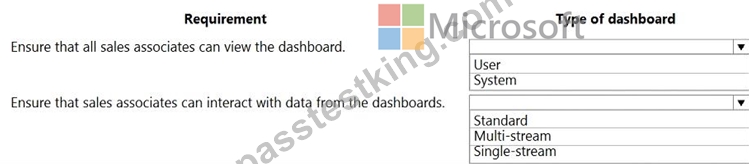
Answer:
Explanation: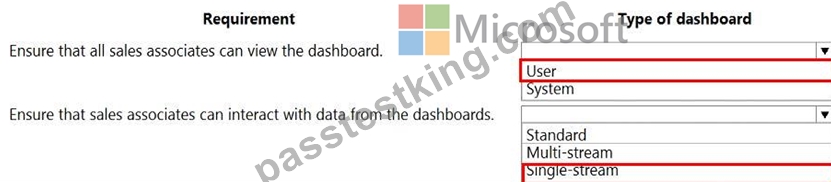
Explanation:
Box 1: User
Type of dashboard: If you want your dashboards to be available across the organization and do not want to manage the access levels at a more detailed level, you might want to create an organization-owned dashboard. However, if you are concerned about the access privileges and security of your dashboard, consider creating a user-owned dashboard where you have more control on who can access it.
Box 2: Single-stream
The single-stream dashboards display real-time data over one stream based on an entity view or queue. The single-stream dashboards are typically helpful to Tier 2 service leads or managers, who monitor fewer, but more complex or escalated cases.
Reference:
https://docs.microsoft.com/en-us/powerapps/developer/model-driven-apps/create-dashboard
https://docs.microsoft.com/en-us/powerapps/maker/model-driven-apps/configure-interactive-experience-dashboards
NEW QUESTION 78
You need to provide the app to Tailwind Traders.
What should you do?
- A. Use the Share App feature.
- B. Within Managed Properties, set the value of the Allow customizations option to false. Export the app as a managed solution.
- C. Within Managed Properties, set the value of the Allow customizations option to false. Export the app as an unmanaged solution.
- D. Within Managed Properties, set the value of the Allow customizations option to true. Export the app as a managed solution.
Answer: B
Explanation:
Scenario: The completed app and all supporting components must be provided to Tailwind Traders. Tailwind Traders must not be able to make changes to any of the components.
Managed Solution: A managed solution is a finalized solution that can be distributed and installed. They are created by exporting an unmanaged solution by setting restrictions to prevent any further customizations. The whole point of Managed is locking down the Component states so they cannot be edited. Deleting the Managed Solution will remove all its customisations as well as data contained. Managed Solutions become read only once deployed so they cannot be manipulated.
Reference:
https://powerusers.microsoft.com/t5/Power-Apps-Pro-Dev-ISV/Managed-vs-Unmanaged/td-p/495685
NEW QUESTION 79
You are configuring security to enable users to analyze data by using Microsoft Excel templates.
You create a security role named TemplateAdministrator and configure the role as shown below and assign the role to a user named User1.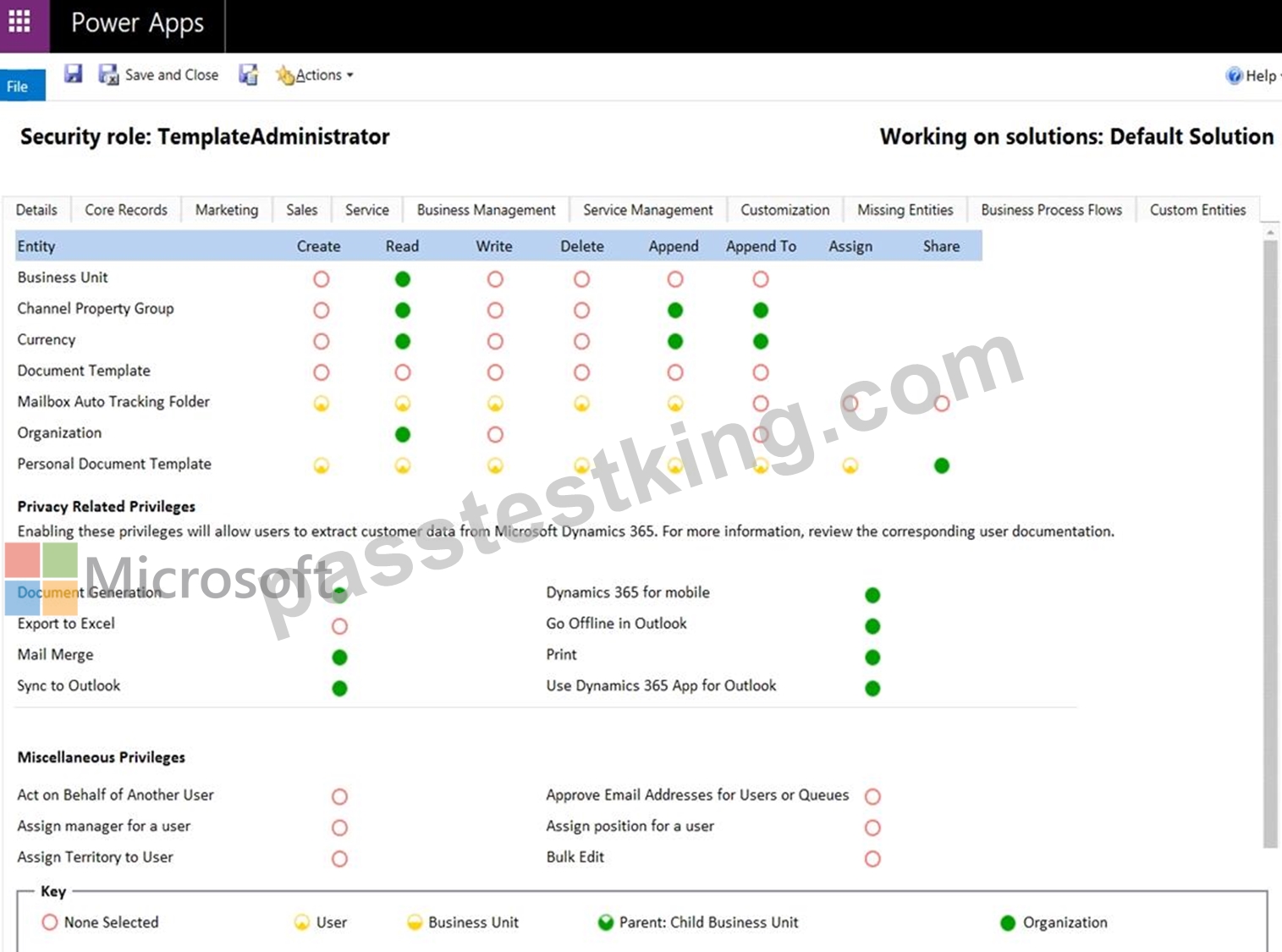
Use the drop-down menus to select the answer choice that answers each question based on the information presented in the graphic.
NOTE: Each correct selection is worth one point.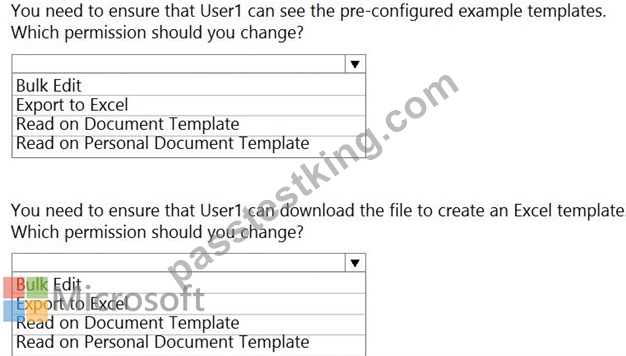
Answer:
Explanation: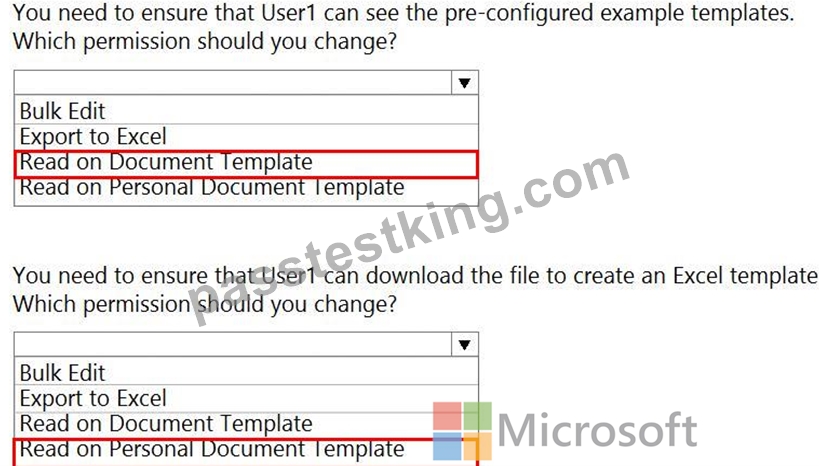
NEW QUESTION 80
......
The PL-100 test, also known as the Microsoft Power Platform App Maker certification exam, is designed to validate the competency of candidates at the associate-level to perform key technical business analysis tasks including basic UX design, data modeling, process and requirements analysis.
Latest PL-100 Pass Guaranteed Exam Dumps Certification Sample Questions: https://www.passtestking.com/Microsoft/PL-100-practice-exam-dumps.html
PL-100 Exam with Guarantee Updated 128 Questions: https://drive.google.com/open?id=1LnVOKmySeHLWRfAwc28VGpve3DqjlNUc